> For the complete documentation index, see [llms.txt](https://docs.terrakube.io/llms.txt). Markdown versions of documentation pages are available by appending `.md` to page URLs; this page is available as [Markdown](https://docs.terrakube.io/getting-started/deployment/custom-ca-certs.md).
# Custom CA Certs
### Adding certificates at runtime
Terrakube componentes (api, registry and executor) are using [buildpacks](https://buildpacks.io/docs/concepts/) to create the docker images
When using buildpack to add a custom CA certificate at runtime you need to do the following:
Provide the following environment variable to the container:
```
SERVICE_BINDING_ROOT: /mnt/platform/bindings
```
Inside the path there is a folder call "ca-certificates"
```
cnb@terrakube-api-678cb68d5b-ns5gt:/mnt/platform/bindings$ ls
ca-certificates
```
We need to mount some information to that path
```
/mnt/platform/bindings/ca-certificates
```
Inside this folder we should put out custom PEM CA certs and one additional file call **type**
```
cnb@terrakube-api-678cb68d5b-ns5gt:/mnt/platform/bindings/ca-certificates$ ls
terrakubeDemo1.pem terrakubeDemo2.pem type
```
The content of the file **type** is just the text **"ca-certificates"**
```
cnb@terrakube-api-678cb68d5b-ns5gt:/mnt/platform/bindings/ca-certificates$ cat type
ca-certificates
```
Finally your helm terrakube.yaml should look something like this because we are mounting out CA certs and the file called **type** in the following path **" /mnt/platform/bindings/ca-certificates"**
```
## Terrakube Security
security:
caCerts:
terrakubeDemo1.pem: |
-----BEGIN CERTIFICATE-----
MIIDZTCCA.........
-----END CERTIFICATE-----
terrakubeDemo2.pem: |
-----BEGIN CERTIFICATE-----
MIIDZTCCA.....
-----END CERTIFICATE-----
```
Version 4.2.6 and later will automatically mount certificates passed via `security.caCerts`. If you are using version 4.2.5 or below of the Helm chart, you also need to explicitly mount the certificates. Repeat for `api`, `executor` and `registry`:
```yaml
api:
env:
- name: SERVICE_BINDING_ROOT
value: /mnt/platform/bindings
volumes:
- name: ca-certs
secret:
secretName: terrakube-ca-secrets
items:
- key: "terrakubeDemo1.pem"
path: "terrakubeDemo1.pem"
- key: "terrakubeDemo2.pem"
path: "terrakubeDemo2.pem"
- key: "type"
path: "type"
volumeMounts:
- name: ca-certs
mountPath: /mnt/platform/bindings/ca-certificates
readOnly: true
```
{% hint style="warning" %}
When mounting the volume with the ca secrets dont forget to add the key "type", the content of the file is already defined inside the helm chart
{% endhint %}
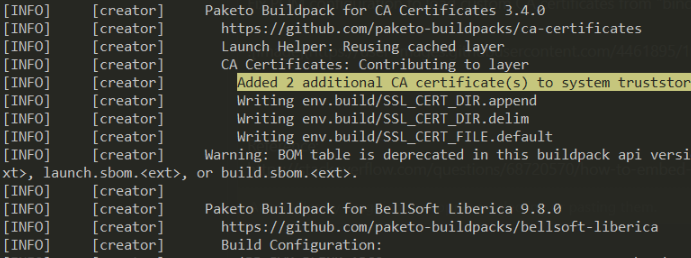
Checking the terrakube component two additional ca certs are added inside the sytem truststore
```
Added 2 additional CA certificate(s) to system truststore
Setting Active Processor Count to 2
Calculating JVM memory based on 5791152K available memory
For more information on this calculation, see https://paketo.io/docs/reference/java-reference/#memory-calculator
Calculated JVM Memory Configuration: -XX:MaxDirectMemorySize=10M -Xmx5033128K -XX:MaxMetaspaceSize=246023K -XX:ReservedCodeCacheSize=240M -Xss1M (Total Memory: 5791152K, Thread Count: 250, Loaded Class Count: 41022, Headroom: 0%)
Enabling Java Native Memory Tracking
Adding 126 container CA certificates to JVM truststore
Spring Cloud Bindings Enabled
Picked up JAVA_TOOL_OPTIONS: -Djava.security.properties=/layers/paketo-buildpacks_bellsoft-liberica/java-security-properties/java-security.properties -XX:+ExitOnOutOfMemoryError -XX:ActiveProcessorCount=2 -XX:MaxDirectMemorySize=10M -Xmx5033128K -XX:MaxMetaspaceSize=246023K -XX:ReservedCodeCacheSize=240M -Xss1M -XX:+UnlockDiagnosticVMOptions -XX:NativeMemoryTracking=summary -XX:+PrintNMTStatistics -Dorg.springframework.cloud.bindings.boot.enable=true
. ____ _ __ _ _
/\\ / ___'_ __ _ _(_)_ __ __ _ \ \ \ \
( ( )\___ | '_ | '_| | '_ \/ _` | \ \ \ \
\\/ ___)| |_)| | | | | || (_| | ) ) ) )
' |____| .__|_| |_|_| |_\__, | / / / /
=========|_|==============|___/=/_/_/_/
:: Spring Boot :: (v2.7.8)
```
Additinal information about buildpacks can be found in this link:
* [https://blog.dahanne.net/2021/02/06/customizing-cloud-native-buildpacks-practical-examples/#Add\_certificates\_binding\_at\_runtime:\~:text=ca%2Dcertificates-,Add%20certificates%20binding%20at%20runtime,-If%20your%20image](https://blog.dahanne.net/2021/02/06/customizing-cloud-native-buildpacks-practical-examples/#Add_certificates_binding_at_runtime)
*
*
### Adding certificate at build time
Terrakube allow to add the certs when building the application, to use this option use the following:
```
git clone https://github.com/AzBuilder/terrakube
cd terrakube
git checkout <>
mv EXAMPLE.pem bindings/ca-certificates
# This script should be run from the root folder
./scripts/build/terrakubeBuild.sh
```
The certs will be added at runtime as the following image.
---
# Agent Instructions
This documentation is published with GitBook. GitBook is the documentation platform designed so that both humans and AI agents can read, navigate, and reason over technical content effectively. Learn more at gitbook.com.
## Querying This Documentation
If you need additional information that is not directly available in this page, you can query the documentation by asking a question.
Perform an HTTP GET request on the following URL with the `ask` and `goal` query parameters:
```
GET https://docs.terrakube.io/getting-started/deployment/custom-ca-certs.md?ask=&goal=
```
`ask` is the immediate question: it should be specific, self-contained, and written in natural language.
`goal` is what the user is ultimately trying to achieve, the reason they need the answer. Sharing it helps GitBook give you a better, more relevant answer. A goal is most helpful when it describes the outcome the user wants rather than restating the question. For example, with `ask=how do I create an API token`, a goal like `automate deployments from our CI pipeline` lets GitBook tailor the answer to that use case.
The response will contain a direct answer to the question and relevant excerpts and sources from the documentation.
Use this mechanism when the answer is not explicitly present in the current page, you need clarification or additional context, or you want to retrieve related documentation sections.