> For the complete documentation index, see [llms.txt](https://docs.terrakube.io/llms.txt). Markdown versions of documentation pages are available by appending `.md` to page URLs; this page is available as [Markdown](https://docs.terrakube.io/getting-started/deployment/minikube-+-https.md).
# Minikube + HTTPS
Terrakube can be installed in **minikube** as a sandbox environment with **HTTPS**, using terrakube with **HTTPS** will allow to use the Terraform registry and the Terraform remote state backend to be used locally without any issue.
Please follow these instructions:
Requirements:
* Install [mkcert](https://github.com/FiloSottile/mkcert#installation) to generate the local certificates.
We will be using following domains in our test installation:
```
terrakube-api.minikube.net
terrakube-ui.minikube.net
terrakube-reg.minikube.net
```
### Generate local CA certificate
```
mkcert -install
Created a new local CA 💥
The local CA is now installed in the system trust store! ⚡️
The local CA is now installed in the Firefox trust store (requires browser restart)! 🦊
```
### Local CA certificate path
```
mkcert -CAROOT
/home/myuser/.local/share/mkcert
```
### Local CA certificate content
```
cat /home/myuser/.local/share/mkcert/rootCA.pem
```
### Generate certificate for \*.minikube.net
These command will generate two files key.pem and cert.pem that we will be using later.
```
mkcert -key-file key.pem -cert-file cert.pem minikube.net *.minikube.net
Created a new certificate valid for the following names 📜
- "minikube.net"
- "*.minikube.net"
Reminder: X.509 wildcards only go one level deep, so this won't match a.b.minikube.net ℹ️
The certificate is at "cert.pem" and the key at "key.pem" ✅
It will expire on 19 January 2026 🗓
```
Now we have all the necessary to install Terrakube with **HTTPS**
### Setup Helm Repository
```
helm repo add terrakube-repo https://charts.terrakube.io
helm repo update
```
### Setup Minikube
{% hint style="info" %}
Copy the minikube ip address ( Example: 192.168.59.100)
{% endhint %}
### Create Kubernetes secret with local certificate
```
kubectl -n kube-system create secret tls mkcert --key key.pem --cert cert.pem
```
### Setup Terrakube namespace
```
kubectl create namespace terrakube
```
### Setup DNS records
```
sudo nano /etc/hosts
192.168.59.100 terrakube-ui.minikube.net
192.168.59.100 terrakube-api.minikube.net
192.168.59.100 terrakube-reg.minikube.net
```
### Setup Ingress Certificates
```
minikube addons configure ingress
-- Enter custom cert(format is "namespace/secret"): kube-system/mkcert
✅ ingress was successfully configured
minikube addons disable ingress
🌑 "The 'ingress' addon is disabled
minikube addons enable ingress
🔎 Verifying ingress addon...
🌟 The 'ingress' addon is enabled
```
### Helm Values.
We need to generate a file called **values.yaml** with the following using the content of our rootCa.pem from the previous step:
```
security:
caCerts:
rootCA.pem: |
-----BEGIN CERTIFICATE-----
XXXXXXXXXXXXXXXXXXXXXXXXXXXXXXXXXXXXXXXXXXXXXXXXXXXXXXXXXXXXXXXX
XXXXXXXXXXXXXXXXXXXXXXXXXXXXXXXXXXXXXXXXXXXXXXXXXXXXXXXXXXXXXXXX
XXXXXXXXXXXXXXXXXXXXXXXXXXXXXXXXXXXXXXXXXXXXXXXXXXXXXXXXXXXXXXXX
XXXXXXXXXXXXXXXXXXXXXXXXXXXXXXXXXXXXXXXXXXXXXXXXXXXXXXXXXXXXXXXX
XXXXXXXXXXXXXXXXXXXXXXXXXXXXXXXXXXXXXXXXXXXXXXXXXXXXXXXXXXXXXXXX
XXXXXXXXXXXXXXXXXXXXXXXXXXXXXXXXXXXXXXXXXXXXXXXXXXXXXXXXXXXXXXXX
XXXXXXXXXXXXXXXXXXXXXXXXXXXXXXXXXXXXXXXXXXXXXXXXXXXXXXXXXXXXXXXX
XXXXXXXXXXXXXXXXXXXXXXXXXXXXXXXXXXXXXXXXXXXXXXXXXXXXXXXXXXXXXXXX
XXXXXXXXXXXXXXXXXXXXXXXXXXXXXXXXXXXXXXXXXXXXXXXXXXXXXXXXXXXXXXXX
XXXXXXXXXXXXXXXXXXXXXXXXXXXXXXXXXXXXXXXXXXXXXXXXXXXXXXXXXXXXXXXX
XXXXXXXXXXXXXXXXXXXXXXXXXXXXXXXXXXXXXXXXXXXXXXXXXXXXXXXXXXXXXXXX
-----END CERTIFICATE-----
api:
properties:
databaseType: "H2"
registry:
enabled: true
replicaCount: "1"
serviceType: "ClusterIP"
dex:
config:
issuer: https://terrakube-api.minikube.net/dex
storage:
type: memory
web:
http: 0.0.0.0:5556
allowedOrigins: ['*']
skipApprovalScreen: true
oauth2:
responseTypes: ["code", "token", "id_token"]
connectors:
- type: ldap
name: OpenLDAP
id: ldap
config:
# The following configurations seem to work with OpenLDAP:
#
# 1) Plain LDAP, without TLS:
host: terrakube-openldap-service:1389
insecureNoSSL: true
#
# 2) LDAPS without certificate validation:
#host: localhost:636
#insecureNoSSL: false
#insecureSkipVerify: true
#
# 3) LDAPS with certificate validation:
#host: YOUR-HOSTNAME:636
#insecureNoSSL: false
#insecureSkipVerify: false
#rootCAData: 'CERT'
# ...where CERT="$( base64 -w 0 your-cert.crt )"
# This would normally be a read-only user.
bindDN: cn=admin,dc=example,dc=org
bindPW: admin
usernamePrompt: Email Address
userSearch:
baseDN: ou=users,dc=example,dc=org
filter: "(objectClass=person)"
username: mail
# "DN" (case sensitive) is a special attribute name. It indicates that
# this value should be taken from the entity's DN not an attribute on
# the entity.
idAttr: DN
emailAttr: mail
nameAttr: cn
groupSearch:
baseDN: ou=Groups,dc=example,dc=org
filter: "(objectClass=groupOfNames)"
userMatchers:
# A user is a member of a group when their DN matches
# the value of a "member" attribute on the group entity.
- userAttr: DN
groupAttr: member
# The group name should be the "cn" value.
nameAttr: cn
staticClients:
- id: example-app
redirectURIs:
- 'https://terrakube-ui.minikube.net'
- '/device/callback'
- 'http://localhost:10000/login'
- 'http://localhost:10001/login'
name: 'example-app'
public: true
## Ingress properties
ingress:
useTls: true
includeTlsHosts: true
ui:
enabled: true
domain: "terrakube-ui.minikube.net"
path: "/"
pathType: "Prefix"
tlsSecretName: tls-secret-ui-terrakube
ingressClassName: "nginx"
annotations:
nginx.ingress.kubernetes.io/use-regex: "true"
api:
enabled: true
domain: "terrakube-api.minikube.net"
path: "/"
pathType: "Prefix"
tlsSecretName: tls-secret-api-terrakube
ingressClassName: "nginx"
annotations:
nginx.ingress.kubernetes.io/use-regex: "true"
nginx.ingress.kubernetes.io/proxy-set-headers: "terrakube/custom-headers"
registry:
enabled: true
domain: "terrakube-reg.minikube.net"
path: "/"
pathType: "Prefix"
tlsSecretName: tls-secret-reg-terrakube
ingressClassName: "nginx"
annotations:
nginx.ingress.kubernetes.io/use-regex: "true"
nginx.ingress.kubernetes.io/proxy-set-headers: "terrakube/custom-headers"
dex:
enabled: true
path: "/dex/"
pathType: "Prefix"
annotations:
nginx.ingress.kubernetes.io/use-regex: "true"
nginx.ingress.kubernetes.io/proxy-set-headers: "terrakube/custom-headers"
```
{% hint style="warning" %}
If you are following this guild for Terrakube 4.2.5 or lower, you will also have to mount the CA certs explicitly. For more information, see [Custom CA certs](/getting-started/deployment/custom-ca-certs.md)
{% endhint %}
### Install Terrakube with local HTTPS support
```
helm install terrakube terrakube-repo/terrakube -n terrakube --values values.yaml
```
###
{% hint style="warning" %}
If you found the following message "***Snippet directives are disabled by the Ingress administrator***", please update the ***ingres-nginx-controller configMap in namespace ingress-nginx adding the following:***
```
allow-snippet-annotations: "true"
Reference: https://github.com/terrakube-io/terrakube/issues/618#issuecomment-1838980
```
{% endhint %}
### Using Terrakube
The environment has some users, groups and sample data so you can test it quickly.
Visit **** and login using **** with password **admin**
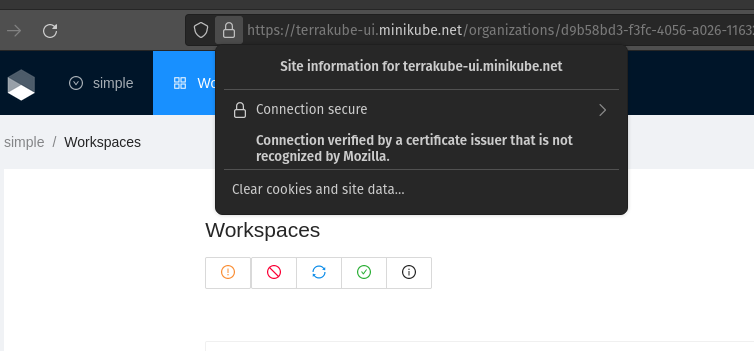
We should be able to use the UI using a valid certificate.
### Mac Networking
When using mac there is an additional step to access terrakube please check the following tool to access the app
### Connect to Terrakube
Using terraform we can connect to the terrakube api and the private registry using the following command with the same credentials that we used to login to the UI.
```
terraform login terrakube-api.minikube.net
terraform login terrakube-reg.minikube.net
```
### Terraform Remote State.
Lets create a simple Terraform file.
```
terraform {
cloud {
organization = "simple"
hostname = "terrakube-api.minikube.net"
workspaces {
tags = ["myplayground", "example"]
}
}
}
# This resource will destroy (potentially immediately) after null_resource.next
resource "null_resource" "previous" {}
resource "time_sleep" "wait_5_seconds" {
depends_on = [null_resource.previous]
create_duration = "5s"
}
# This resource will create (at least) 30 seconds after null_resource.previous
resource "null_resource" "next" {
depends_on = [time_sleep.wait_5_seconds]
}
```
### Execute Terraform Remotely
#### Terraform Init:
```shell
$ terraform init
Initializing Terraform Cloud...
No workspaces found.
There are no workspaces with the configured tags (example, myplayground)
in your Terraform Cloud organization. To finish initializing, Terraform needs at
least one workspace available.
Terraform can create a properly tagged workspace for you now. Please enter a
name to create a new Terraform Cloud workspace.
Enter a value: simple
Initializing provider plugins...
- Finding latest version of hashicorp/null...
- Finding latest version of hashicorp/time...
- Installing hashicorp/null v3.2.1...
- Installed hashicorp/null v3.2.1 (signed by HashiCorp)
- Installing hashicorp/time v0.9.1...
- Installed hashicorp/time v0.9.1 (signed by HashiCorp)
Terraform has created a lock file .terraform.lock.hcl to record the provider
selections it made above. Include this file in your version control repository
so that Terraform can guarantee to make the same selections by default when
you run "terraform init" in the future.
```
#### Terraform apply:
```bash
$ terraform apply
Running apply in Terraform Cloud. Output will stream here. Pressing Ctrl-C
will cancel the remote apply if it's still pending. If the apply started it
will stop streaming the logs, but will not stop the apply running remotely.
Preparing the remote apply...
To view this run in a browser, visit:
https://terrakube-api.minikube.net/app/simple/simple/runs/40
Waiting for the plan to start...
***************************************
Running Terraform PLAN
***************************************
Terraform used the selected providers to generate the following execution
plan. Resource actions are indicated with the following symbols:
+ create
Terraform will perform the following actions:
# null_resource.next will be created
+ resource "null_resource" "next" {
+ id = (known after apply)
}
# null_resource.previous will be created
+ resource "null_resource" "previous" {
+ id = (known after apply)
}
# time_sleep.wait_5_seconds will be created
+ resource "time_sleep" "wait_5_seconds" {
+ create_duration = "5s"
+ id = (known after apply)
}
Plan: 3 to add, 0 to change, 0 to destroy.
Changes to Outputs:
+ creation_time = "5s"
Do you want to perform these actions in workspace "simple"?
Terraform will perform the actions described above.
Only 'yes' will be accepted to approve.
Enter a value: yes
null_resource.previous: Creating...
null_resource.previous: Creation complete after 0s [id=6182221597368620892]
time_sleep.wait_5_seconds: Creating...
time_sleep.wait_5_seconds: Creation complete after 5s [id=2023-10-19T20:25:22Z]
null_resource.next: Creating...
null_resource.next: Creation complete after 0s [id=9093191930998774410]
Apply complete! Resources: 3 added, 0 changed, 0 destroyed.
```
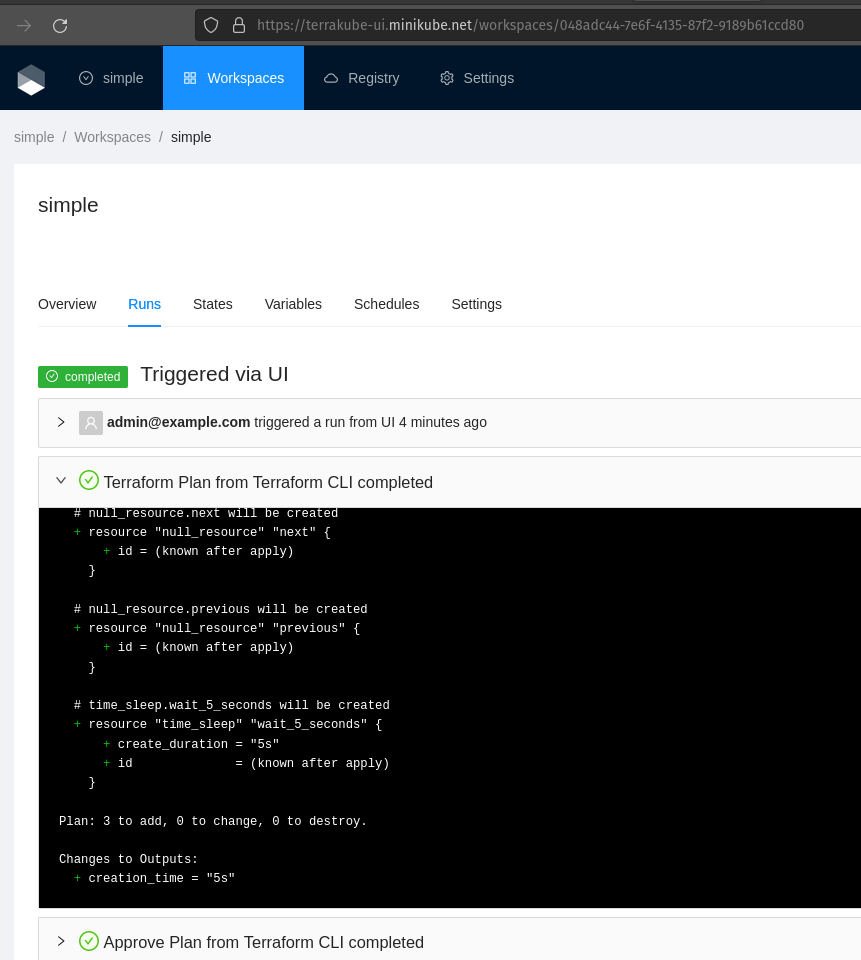
#### Checking the UI will show:
---
# Agent Instructions
This documentation is published with GitBook. GitBook is the documentation platform designed so that both humans and AI agents can read, navigate, and reason over technical content effectively. Learn more at gitbook.com.
## Querying This Documentation
If you need additional information that is not directly available in this page, you can query the documentation by asking a question.
Perform an HTTP GET request on the following URL with the `ask` and `goal` query parameters:
```
GET https://docs.terrakube.io/getting-started/deployment/minikube-+-https.md?ask=&goal=
```
`ask` is the immediate question: it should be specific, self-contained, and written in natural language.
`goal` is what the user is ultimately trying to achieve, the reason they need the answer. Sharing it helps GitBook give you a better, more relevant answer. A goal is most helpful when it describes the outcome the user wants rather than restating the question. For example, with `ask=how do I create an API token`, a goal like `automate deployments from our CI pipeline` lets GitBook tailor the answer to that use case.
The response will contain a direct answer to the question and relevant excerpts and sources from the documentation.
Use this mechanism when the answer is not explicitly present in the current page, you need clarification or additional context, or you want to retrieve related documentation sections.