> For the complete documentation index, see [llms.txt](https://docs.terrakube.io/llms.txt). Markdown versions of documentation pages are available by appending `.md` to page URLs; this page is available as [Markdown](https://docs.terrakube.io/getting-started/deployment/ephemeral-agents.md).
# Ephemeral Agents
{% hint style="warning" %}
This feature is supported from version 2.22.0
{% endhint %}
The following will explain how to run the executor component in`"ephemeral"` mode.
These environment variables can be used to customize the API component:
* ExecutorEphemeralNamespace (Default value: "terrakube")
* ExecutorEphemeralImage (Defatul value: "azbuilder/executor:2.22.0" )
* ExecutorEphemeralSecret (Default value: "terrakube-executor-secrets" )
> The above is basically to control where the job will be created and executed and to mount the secrets required by the executor component
Internally the Executor component will use the following to run in `"ephemeral"` :
* EphemeralFlagBatch (Default value: "false")
* EphemeralJobData, this contains all the data that the executor need to run.
### Helm Chat Configuration (Automatic)
To enable the ephemeral executor using the helm chart please use the following options:
```yaml
api:
serviceAccountName: "terrakube-api-service-account"
ephemeralExecution:
enabled: true
```
### Manual Configuration
To use Ephemeral executors we need to create the following configuration:
#### Service Account Creation
```
apiVersion: v1
kind: ServiceAccount
metadata:
name: terrakube-api-service-account
namespace: terrakube
```
#### Role Creation
```
apiVersion: rbac.authorization.k8s.io/v1
kind: Role
metadata:
namespace: terrakube
name: terrakube-api-role
rules:
- apiGroups: ["batch"]
resources: ["jobs"]
verbs: ["get", "list", "watch", "create", "update", "patch", "delete"]
```
#### Role Binding Creation
```
apiVersion: rbac.authorization.k8s.io/v1
kind: RoleBinding
metadata:
name: terrakube-api-role-binding
namespace: terrakube
subjects:
- kind: ServiceAccount
name: terrakube-api-service-account
namespace: terrakube
roleRef:
kind: Role
name: terrakube-api-role
apiGroup: rbac.authorization.k8s.io
```
#### Workspace Configuration
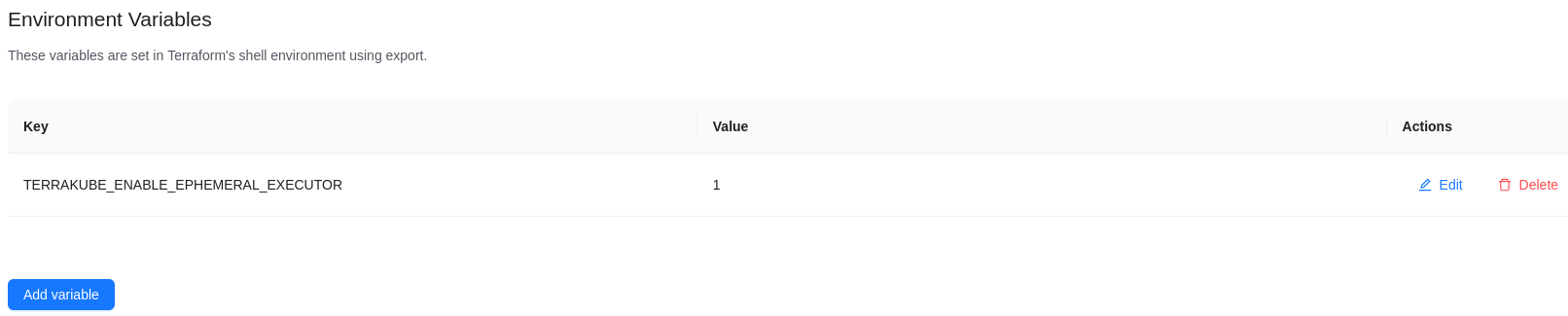
Add the environment variable `TERRAKUBE_ENABLE_EPHEMERAL_EXECUTOR=1` like the image below
#### Workspace Execution
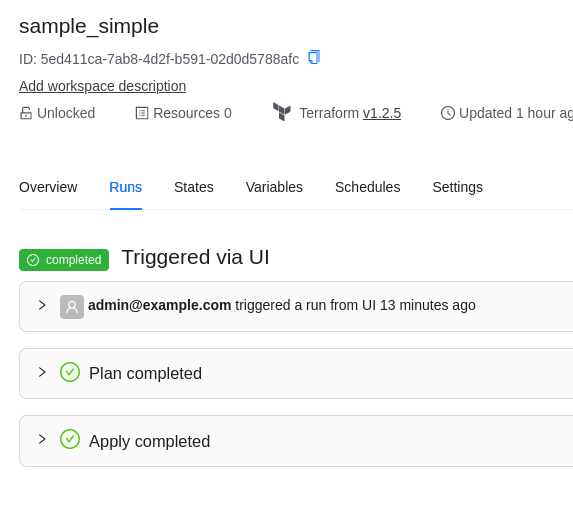
Now when the job is running internally Terrakube will create a K8S job and will execute each step of the job in a `"ephemeral executor"`
Internal Kubernetes Job Example:
Plan Running in a pod:
Apply Running in a different pod:
### Job Controls
{% hint style="warning" %}
These settings are supported from version 2.34.0
{% endhint %}
The following environment variables on the API component control the Kubernetes Job created for each ephemeral step. They apply to every ephemeral job in the cluster and cannot be overridden per workspace.
| Variable | Helm value (`api.ephemeralExecution.*`) | Default | Description |
| ---------------------------------------------- | --------------------------------------- | ----------------------------- | ----------------------------------------------------------------------------------------- |
| ExecutorEphemeralActiveDeadlineSeconds | activeDeadlineSeconds | unset (no deadline) | Maximum seconds a job may run before Kubernetes terminates it as failed. |
| ExecutorEphemeralBackoffLimit | backoffLimit | unset (Kubernetes default, 6) | Number of retries before the job is marked failed. Set to `0` for at-most-once execution. |
| ExecutorEphemeralTerminationGracePeriodSeconds | terminationGracePeriodSeconds | 60 | Seconds the pod gets to shut down cleanly after SIGTERM before Kubernetes sends SIGKILL. |
| ExecutorEphemeralTtlSecondsAfterFinished | ttlSecondsAfterFinished | 30 | Seconds after completion before the job and its pod are deleted. |
```yaml
api:
ephemeralExecution:
enabled: true
activeDeadlineSeconds: "3600"
backoffLimit: "0"
terminationGracePeriodSeconds: "60"
ttlSecondsAfterFinished: "300"
```
#### Active deadline
* The deadline is counted from the Job's `startTime`, which is set before the pod is scheduled or its image is pulled. Node autoscaling and large image pulls count against it, so avoid very small values.
* It is Job-wide: every retry allowed by `backoffLimit` shares the one deadline, and the deadline takes precedence over any retries left.
* A single cluster-wide value has to fit your longest legitimate apply, otherwise long runs are terminated with `DeadlineExceeded`.
* When the deadline fires, the run fails with the message `Executor pod is shutting down`.
* If the pod is killed before the executor has started (still scheduling or pulling its image), nothing reports back to the API. The run is failed by the API's heartbeat sweep after `ReconciliationHeartbeatGracePeriodSeconds` (default 300), not immediately.
#### Backoff limit
Each retry runs in a brand-new pod. A step that died while holding the Terraform state lock will fail immediately on that lock when retried, and a step that had already applied non-idempotent changes may duplicate them. Set `backoffLimit` to `0` if you want a failed step to fail once and stop.
#### Termination grace period
On shutdown Terraform receives SIGTERM and 10 seconds (fixed by the Terraform client used by the executor) to exit before it is killed. That wait only starts after Spring's shutdown phase, which by default can take up to 30 seconds (`spring.lifecycle.timeout-per-shutdown-phase`) while the running job is stopped. The default of 60 seconds covers both, but raising `terminationGracePeriodSeconds` does not give Terraform more than the 10 seconds, so a long-running apply can still be killed while holding the state lock.
#### TTL after finished
The default of 30 seconds is a tight window to run `kubectl describe pod` or `kubectl logs` on a pod that failed before the executor started (image pull failure, missing secret, out-of-memory). Raise it, for example to `300`-`600`, if you need more time to troubleshoot.
### Node Selector.
{% hint style="warning" %}
Adding node selector configuration is available from version 2.23.0
{% endhint %}
If required you can specify the node selector configuration where the pod will be created using something like the following:
```yaml
api:
env:
- name: JAVA_TOOL_OPTIONS
value: "-Dorg.terrakube.executor.ephemeral.nodeSelector.diskType=ssd -Dorg.terrakube.executor.ephemeral.nodeSelector.nodeType=spot"
```
The above will be the equivalent to use the Kubernetes YAML like:
```yaml
nodeSelector:
disktype: ssd
nodeType: spot
```
### Using Environment Variables for Configuration
{% hint style="warning" %}
This feature is supported from version 2.23.0 or 2.24.0
{% endhint %}
The following environment variables can be used to customize the ephemeral executor adding the following values inside the workspace settings:
* EPHEMERAL\_CONFIG\_NODE\_SELECTOR\_TAGS
* Example: key1=value1;key2=value2
* [Reference](https://github.com/AzBuilder/terrakube/pull/1243)
* EPHEMERAL\_CONFIG\_SERVICE\_ACCOUNT
* Example: myserviceaccount
* [Reference](https://github.com/AzBuilder/terrakube/pull/1243)
* EPHEMERAL\_CONFIG\_ANNOTATIONS
* Example: key1=value1;key2=value2
* [Reference](https://github.com/AzBuilder/terrakube/pull/1243)
* EPHEMERAL\_CONFIG\_TOLERATIONS
* Example: `key:operator:effect`
* [`Reference`](https://github.com/AzBuilder/terrakube/pull/1579)
* EPHEMERAL\_CONFIG\_MAP\_NAME
* [Reference](https://github.com/AzBuilder/terrakube/pull/1505)
* EPHEMERAL\_CONFIG\_MAP\_MOUNT\_PATH
* [Reference](https://github.com/AzBuilder/terrakube/pull/1505)
* EPHEMERAL\_CPU\_REQUEST
* Example: `100m` or `1`
* EPHEMERAL\_CPU\_LIMIT
* Example: `200m` or `2`
* EPHEMERAL\_MEMORY\_REQUEST
* Example: `50Mi` or `1Gi`
* EPHEMERAL\_MEMORY\_LIMIT
* Example: `100Mi` or `2Gi`
* EPHEMERAL\_STORAGE\_REQUEST
* Example: `2Gi`
* EPHEMERAL\_STORAGE\_LIMIT
* Example: `4Gi`
More information can be found inside this [code](https://github.com/AzBuilder/terrakube/blob/main/api/src/main/java/org/terrakube/api/plugin/scheduler/job/tcl/executor/ephemeral/EphemeralExecutorService.java)
---
# Agent Instructions
This documentation is published with GitBook. GitBook is the documentation platform designed so that both humans and AI agents can read, navigate, and reason over technical content effectively. Learn more at gitbook.com.
## Querying This Documentation
If you need additional information that is not directly available in this page, you can query the documentation by asking a question.
Perform an HTTP GET request on the following URL with the `ask` and `goal` query parameters:
```
GET https://docs.terrakube.io/getting-started/deployment/ephemeral-agents.md?ask=&goal=
```
`ask` is the immediate question: it should be specific, self-contained, and written in natural language.
`goal` is what the user is ultimately trying to achieve, the reason they need the answer. Sharing it helps GitBook give you a better, more relevant answer. A goal is most helpful when it describes the outcome the user wants rather than restating the question. For example, with `ask=how do I create an API token`, a goal like `automate deployments from our CI pipeline` lets GitBook tailor the answer to that use case.
The response will contain a direct answer to the question and relevant excerpts and sources from the documentation.
Use this mechanism when the answer is not explicitly present in the current page, you need clarification or additional context, or you want to retrieve related documentation sections.