> For the complete documentation index, see [llms.txt](https://docs.terrakube.io/llms.txt). Markdown versions of documentation pages are available by appending `.md` to page URLs; this page is available as [Markdown](https://docs.terrakube.io/2.34.0/run-terraform/workspaces.md).
# Workspaces
When working with Terraform at Enterprise level, you need to organize your infrastructure in different collections. Terrakube manages infrastructure collections with **workspaces**. A workspace contains everything Terraform needs to manage a given collection of infrastructure, so you can easily organize all your resources based in your requirements.
For example, you can create a workspace for dev environment and a different workspace for production. Or you can separate your workspaces based in your resource types, so you can create a workspace for all your SQL Databases and anothers workspace for all your VMS.
You can create unlimited workspaces inside each Terrakube Organization.
### Workspaces list
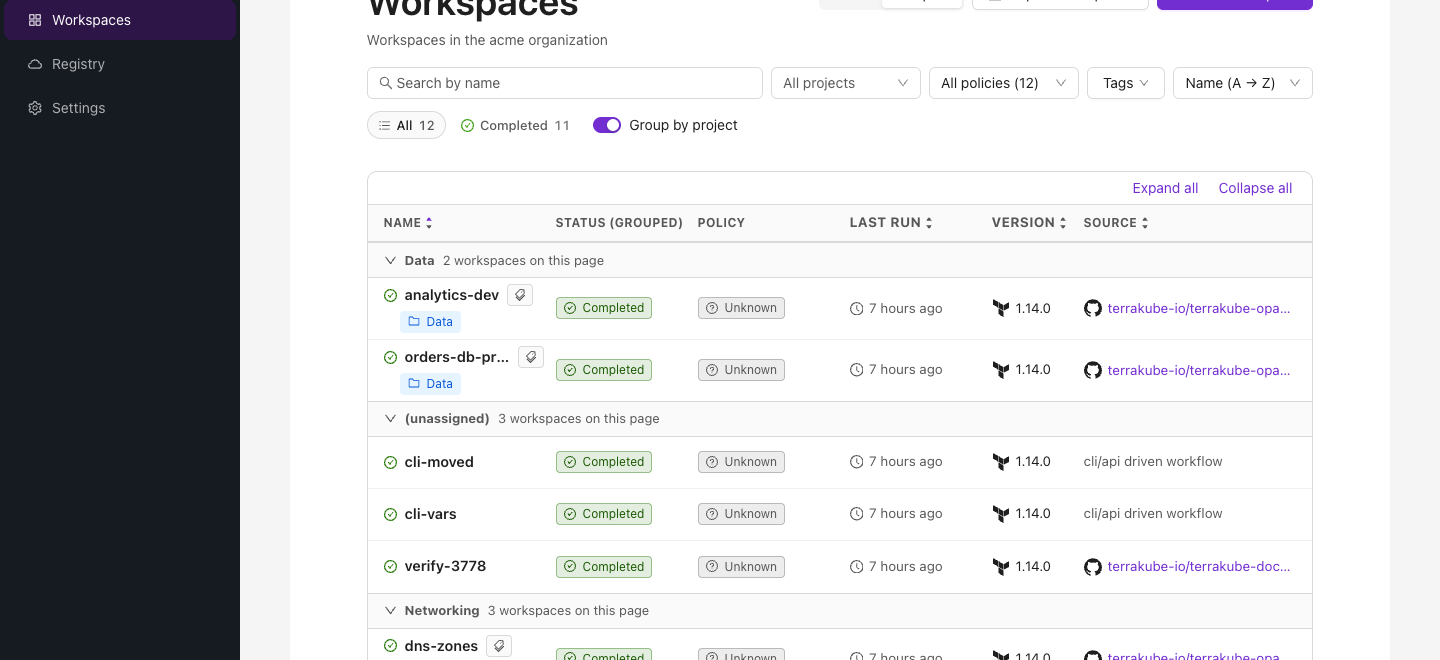
The Workspaces list, grouped by project
The **Workspaces** page has two views, toggled in the top right and remembered per browser:
* **New** — a condensed list with click-to-filter tags and project chips, an optional **group by project** mode (each project paginates independently), and a lock indicator per workspace.
* **Legacy** — the original table view.
Use the search box and tag/project filters to narrow a long list; clicking a tag or project chip on any row applies it as a filter directly.
#### Tags in the list
Each tag is shown as a chip with its key and, for a key/value tag, its value (hover a chip to see `key = value`). Tags are sorted by key, then by value. The **Cards** view shows every tag on each card.
In the **Compact** view, a tag icon next to the workspace name opens all of the workspace's tags in a popover on hover, click or keyboard focus.
#### Filtering by tag
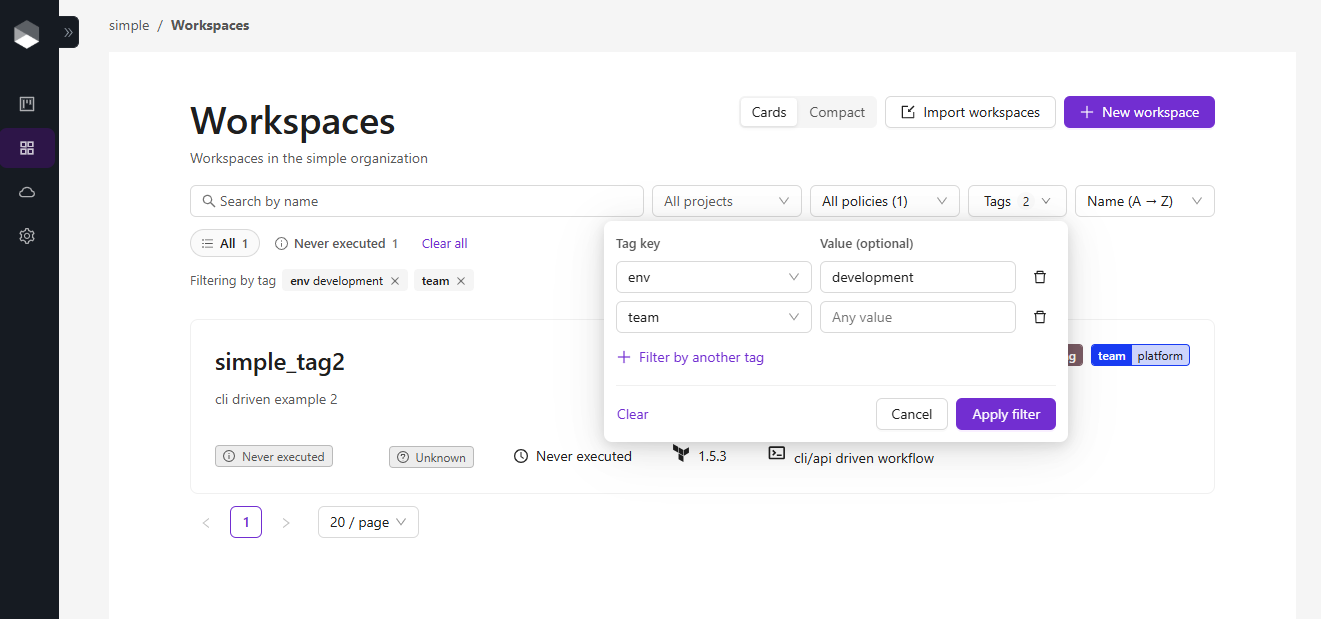
Click **Tags** in the filter bar to open the tag filter. It takes one or more rows, each with a **tag key** and an optional **value**; click **Filter by another tag** to add a row:
* A row with a value matches workspaces where that key has exactly that value, for example `env = development`.
* A row without a value matches every workspace that has the key, whatever its value.
* Several rows are combined with AND, so `env = development` and `team = platform` matches only the workspaces that have both.
Click **Apply filter** to apply the rows, or **Clear** in the tag filter popover to remove just the tag filters.
In this section:
### In this section
**Set up**: [Creating Workspaces](/2.34.0/run-terraform/workspaces/creating-workspaces.md), [Overview](/2.34.0/run-terraform/workspaces/overview.md), [Variables](/2.34.0/run-terraform/workspaces/variables.md), [Team Access](/2.34.0/run-terraform/workspaces/team-access.md)
**Run**: [Starting a Run](/2.34.0/run-terraform/workspaces/starting-a-run.md), [Webhooks](/2.34.0/run-terraform/workspaces/webhooks.md), [Workspace scheduler](/2.34.0/run-terraform/workspaces/workspace-scheduler.md), [Run Triggers](/2.34.0/run-terraform/workspaces/run-triggers.md), [Job Output](/2.34.0/run-terraform/workspaces/job-output.md), [Notifications](/2.34.0/run-terraform/workspaces/notifications.md)
**Workflows**: [CLI-driven](/2.34.0/run-terraform/workspaces/cli-driven-workflow.md), [API-driven](/2.34.0/run-terraform/workspaces/api-driven-workflow.md), [Ephemeral Workspaces](/2.34.0/run-terraform/workspaces/ephemeral-workspaces.md)
**State and caching**: [Terraform State](/2.34.0/run-terraform/workspaces/terraform-state.md), [Share Workspace State](/2.34.0/run-terraform/workspaces/share-workspace-state.md), [Provider Cache](/2.34.0/run-terraform/workspaces/provider-cache.md), [Module Cache](/2.34.0/run-terraform/workspaces/module-cache.md), [Plan Artifacts](/2.34.0/run-terraform/workspaces/plan-artifacts.md)
**Credentials and extensions**: [Dynamic Provider Credentials](/2.34.0/run-terraform/workspaces/dynamic-provider-credentials.md), [Actions](/2.34.0/run-terraform/workspaces/actions.md)
---
# Agent Instructions
This documentation is published with GitBook. GitBook is the documentation platform designed so that both humans and AI agents can read, navigate, and reason over technical content effectively. Learn more at gitbook.com.
## Querying This Documentation
If you need additional information that is not directly available in this page, you can query the documentation by asking a question.
Perform an HTTP GET request on the following URL with the `ask` and `goal` query parameters:
```
GET https://docs.terrakube.io/2.34.0/run-terraform/workspaces.md?ask=&goal=
```
`ask` is the immediate question: it should be specific, self-contained, and written in natural language.
`goal` is what the user is ultimately trying to achieve, the reason they need the answer. Sharing it helps GitBook give you a better, more relevant answer. A goal is most helpful when it describes the outcome the user wants rather than restating the question. For example, with `ask=how do I create an API token`, a goal like `automate deployments from our CI pipeline` lets GitBook tailor the answer to that use case.
The response will contain a direct answer to the question and relevant excerpts and sources from the documentation.
Use this mechanism when the answer is not explicitly present in the current page, you need clarification or additional context, or you want to retrieve related documentation sections.