> For the complete documentation index, see [llms.txt](https://docs.terrakube.io/llms.txt). Markdown versions of documentation pages are available by appending `.md` to page URLs; this page is available as [Markdown](https://docs.terrakube.io/2.34.0/govern/policy-enforcement-opa.md).

# Policy Governance (OPA)

Policy Governance lets a security team write [Open Policy Agent](https://www.openpolicyagent.org/) (Rego) policies once, store them in Git, and have Terrakube enforce them on every run. Policies are evaluated inside the runner against the plan (`plan.json`) **before** apply, and developers cannot remove them by editing workspace code or a template.

{% hint style="info" %}
Available from Terrakube 2.34.0. The older, template-based approach is still documented in [Template-based OPA checks](/2.34.0/govern/policy-enforcement-opa/policy-enforcement-opa-templates.md).
{% endhint %}

### How it fits together

1. A **policy set** points at a folder of Rego in a Git repository and has an **enforcement level**.
2. The policy set is **attached** to the workspaces it governs: the whole organization (global), a project, a tag, or one workspace.
3. After `terraform plan`, the executor evaluates every policy set that applies to the workspace. The result decides whether the run continues.

Policy sets are cumulative: a workspace is checked against the global sets, its project's sets, the sets on its tags, and the sets attached to it directly.

### Start from the reference repository

[`terrakube-io/terrakube-opa-reference`](https://github.com/terrakube-io/terrakube-opa-reference) is a working example of a policy repository: a layout to copy, shared helper libraries, ready-made bundles, unit tests with plan fixtures, and live example workspaces for every outcome. Fork it, keep what you need, and point your policy sets at your fork.

```
terrakube-opa-reference/
├── lib/        shared Rego helpers (plan parsing, tags, networking, blast radius)
├── bundles/    one folder per policy set: common/, password/, aws/, azure/, gcp/
├── fixtures/   sample `terraform show -json` plans for tests
└── examples/   live Terraform and OpenTofu workspaces that trigger each outcome
```

| Bundle                                    | Level            | What it does                                                                               |
| ----------------------------------------- | ---------------- | ------------------------------------------------------------------------------------------ |
| `bundles/common/tagging`                  | `advisory`       | Warns when `Environment`, `Owner` or `CostCenter` tags are missing.                        |
| `bundles/common/blast_radius`             | `soft_mandatory` | Pauses for approval on more than 5 deletions or a high weighted risk score.                |
| `bundles/common/required_providers`       | `hard_mandatory` | Allows only approved provider registries.                                                  |
| `bundles/aws`, `azure`, `gcp` `/baseline` | `hard_mandatory` | Cloud security baselines, such as S3 public access blocks and HTTPS-only storage.          |
| `bundles/password/*`                      | all three levels | A cloud-free suite on `random_password`, handy for trying every level without credentials. |

The repository's own [README](https://github.com/terrakube-io/terrakube-opa-reference#readme) explains how to run its tests with OPA and Regal and how to deploy its policy sets to Terrakube with Terraform. To see every outcome working, its `examples/` workspaces run as the `simple-governance` demo organization that Terrakube seeds in the `demo` profile.

{% hint style="warning" %}
The reference repository is for demonstration and evaluation. Its rules and thresholds are illustrations, not a vetted security baseline. Review and test any policy before it enforces production runs.
{% endhint %}

```mermaid
flowchart TD
    P[Plan step produces plan.json] --> R[Terrakube collects the policy sets that apply:<br/>global + project + tags + workspace]
    R -->|none| N[Continue]
    R --> E[Executor clones each policy repo<br/>and runs OPA against plan.json]
    E --> X{Violations?<br/>exemptions removed}
    X -->|none| N
    X -->|advisory set| W[Warning shown, run continues]
    X -->|soft_mandatory set| A[Waiting approval<br/>override team can override with a justification]
    X -->|hard_mandatory set| F[Run fails, apply blocked]
    A -->|overridden| N
```

### Enforcement levels

| Level            | When the policy fails                                                                                                                     |
| ---------------- | ----------------------------------------------------------------------------------------------------------------------------------------- |
| `hard_mandatory` | The run fails and apply is blocked. It cannot be bypassed.                                                                                |
| `soft_mandatory` | The run stops at **Waiting approval**. Members of the policy set's override team can override it with a justification, which is recorded. |
| `advisory`       | A warning is shown in the logs and the UI. The run carries on.                                                                            |

A policy set can also have a **shadow enforcement level**. Violations of the shadow level are counted and shown but never block a run, so you can trial a stricter level before enabling it.

### Write the policies

Put Rego in a repository folder under the package `terraform.analysis`. This follows the [reference repository](https://github.com/terrakube-io/terrakube-opa-reference), which uses a shared `tfplan` helper library:

```rego
package terraform.analysis

import rego.v1
import data.lib.tfplan

# Hard mandatory: a password shorter than 8 characters blocks the apply
deny contains violation if {
    some res in tfplan.resources_by_type("random_password")
    tfplan.is_create_or_update(res)
    len := tfplan.after_or_empty(res).length
    len < 8
    violation := {
        "rule_id": "password_length_hard_mandatory",
        "resource": res.address,
        "message": sprintf("Password length of %d is below the minimum of 8.", [len]),
    }
}
```

Terrakube reads three rule sets from the package: `deny`, `soft_mandatory` and `warn`. **By convention** each bundle uses the rule that matches the level of the policy set it is attached to: `deny` for `hard_mandatory`, `soft_mandatory` for `soft_mandatory` and `warn` for `advisory`. What a violation does is decided by the policy set's enforcement level: on a `hard_mandatory` set it fails the run, on a `soft_mandatory` set it stops the run for approval, and on an `advisory` set it is only a warning. `warn` violations never block.

Each entry can be a string or an object with `rule_id`, `resource` and `message` (`msg` also works). Shared helpers live in a `lib/` folder next to the bundles and are loaded automatically.

**Parameters** let one bundle be configured per policy set without editing Rego. A parameter `min_length` set on the policy set is available as `data.terrakube.inputs.min_length`:

```rego
configured_min_length := to_number(data.terrakube.inputs.min_length) if {
    data.terrakube.inputs.min_length != ""
}
```

### Create a policy set

Open **Settings → Policy Sets** in an organization and create a set:

| Field                           | Description                                                                                                    |
| ------------------------------- | -------------------------------------------------------------------------------------------------------------- |
| Name / description              | Unique name within the organization.                                                                           |
| Enforcement level               | `hard_mandatory`, `soft_mandatory` or `advisory`.                                                              |
| Override team                   | Team allowed to override `soft_mandatory` violations. Organization admins can always override.                 |
| VCS, repository, branch, folder | Where the Rego lives. Pin `branch` to a tag in your policy repository to roll policy changes out deliberately. |
| OPA version                     | Optional. Defaults to the version configured on the executor.                                                  |
| Global                          | Apply to every workspace in the organization.                                                                  |

Non-global sets are attached to a workspace, project or tag from the same page.

<figure><img src="https://1229094460-files.gitbook.io/~/files/v0/b/gitbook-x-prod.appspot.com/o/spaces%2FTN6M529qVFnas8hChf2y%2Fuploads%2Fgit-blob-d647396895773c40b93215e4eb5147523926358f%2Fpolicy-sets.png?alt=media" alt="Policy sets in an organization, with enforcement level and scope"><figcaption><p>Policy sets in an organization, with enforcement level and scope</p></figcaption></figure>

Set parameters on the policy set. Their values are typed: numbers, booleans and JSON are parsed.

Users need the **Manage Policies** team permission to create or change policy sets and exemptions.

### Review a run

Open the run and select the **Policy checks** tab to see passed rules, warnings and violations grouped by policy set, rule and resource. If a `soft_mandatory` policy blocked the run, an authorized user can override it with a justification (up to 2048 characters). The override is audited, and the run then continues to apply. A run with unresolved violations cannot be approved.

<figure><img src="https://1229094460-files.gitbook.io/~/files/v0/b/gitbook-x-prod.appspot.com/o/spaces%2FTN6M529qVFnas8hChf2y%2Fuploads%2Fgit-blob-4ab53103ccce57d636ac3cc142c8d94fa7d0b009%2Fpolicy-checks-soft-mandatory.png?alt=media" alt="A soft-mandatory violation waiting for an authorized override"><figcaption><p>A soft-mandatory violation waiting for an authorized override</p></figcaption></figure>

The same result is posted as a comment and commit status on pull requests for VCS-driven workspaces.

### Exemptions

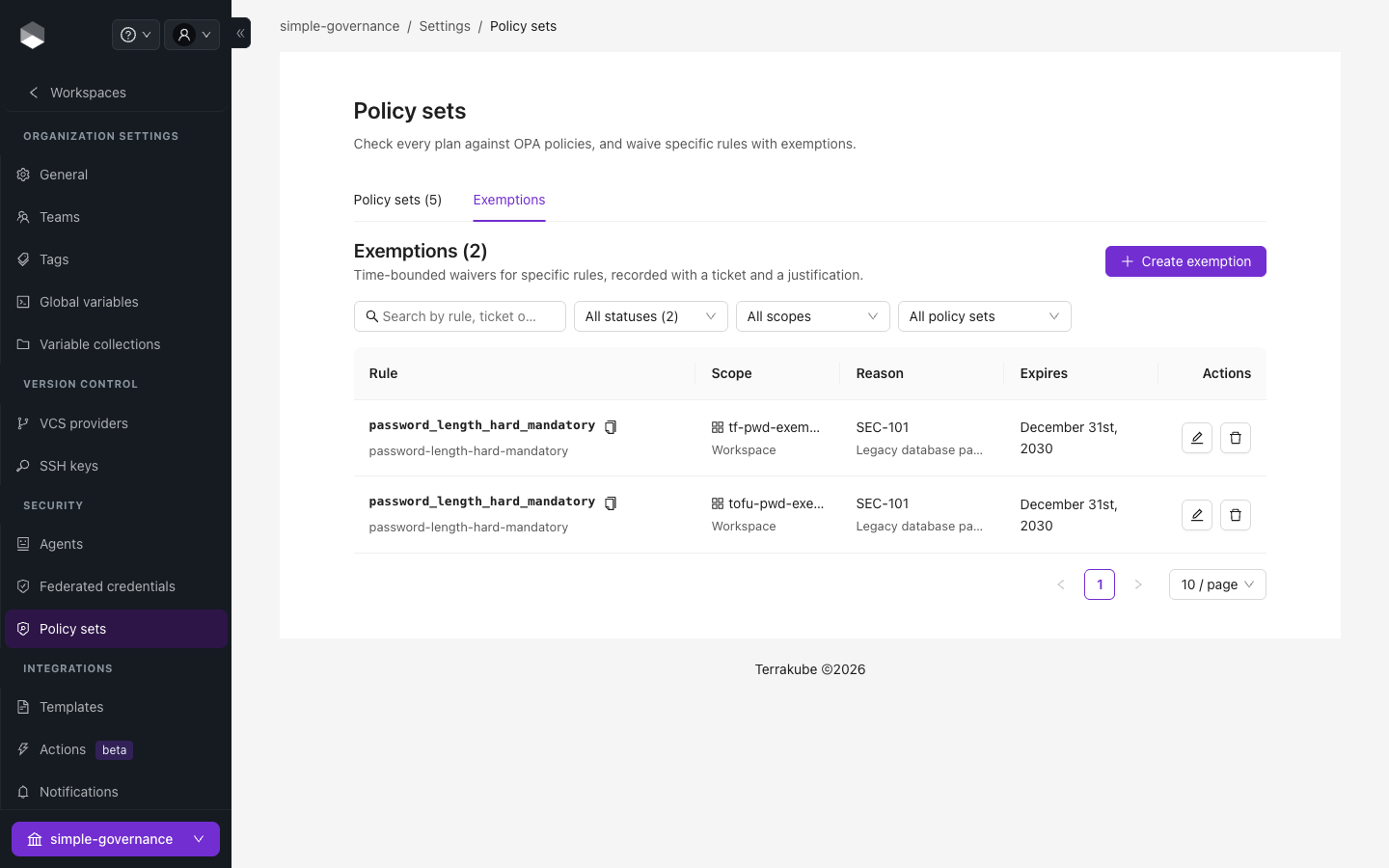
An exemption waives one rule instead of disabling a whole policy set. Create it under **Settings → Policy Sets → Exemptions** with the policy set, the `rule_id`, a ticket reference, a justification, and optionally an expiry date. It can apply to the organization, a project, or a workspace.

<figure><img src="https://1229094460-files.gitbook.io/~/files/v0/b/gitbook-x-prod.appspot.com/o/spaces%2FTN6M529qVFnas8hChf2y%2Fuploads%2Fgit-blob-a864249134ce069cafe50952c5e67c2d65e771a5%2Fpolicy-exemptions.png?alt=media" alt="The Exemptions tab"><figcaption><p>The Exemptions tab</p></figcaption></figure>

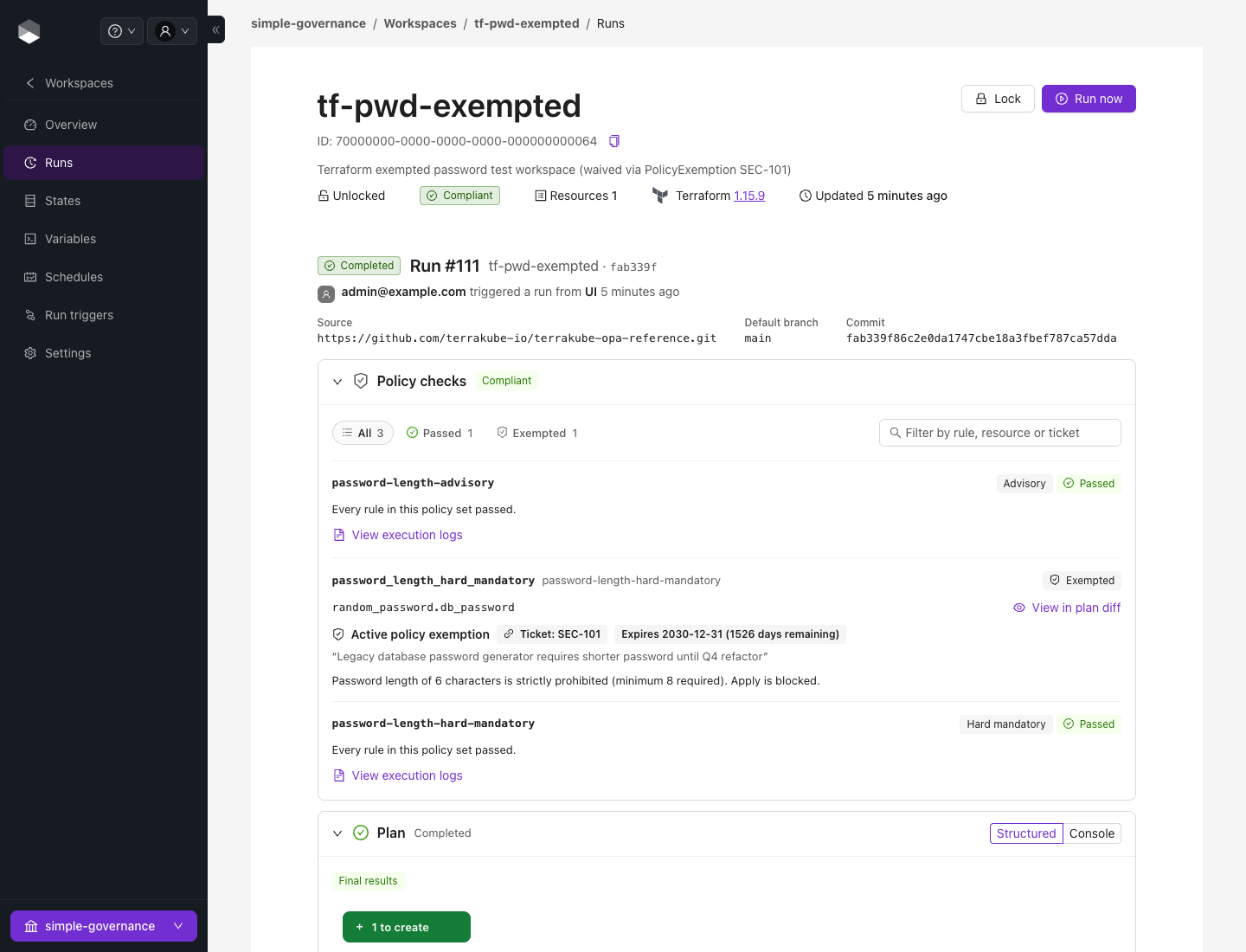
Waived violations are logged as `[EXEMPTED]` and a run that was blocked only by them passes.

<figure><img src="https://1229094460-files.gitbook.io/~/files/v0/b/gitbook-x-prod.appspot.com/o/spaces%2FTN6M529qVFnas8hChf2y%2Fuploads%2Fgit-blob-d8543b3722df136fdcc71032705d3fb421fb7f09%2Fpolicy-checks-exemption.png?alt=media" alt="A violation waived by an exemption, with its ticket and expiry"><figcaption><p>A violation waived by an exemption, with its ticket and expiry</p></figcaption></figure>

### Continuous compliance

A nightly job re-evaluates workspaces so that a new policy set, a changed policy, or an expired exemption surfaces as **non-compliant** without anyone pushing code. The compliance state shows on each workspace.

### Manage policies with Terraform

Policy sets and attachments are resources of the [Terrakube Terraform provider](https://registry.terraform.io/providers/terrakube-io/terrakube/latest/docs), which is the recommended way to roll the same policies out to many organizations:

```hcl
resource "terrakube_policy_set" "blast_radius" {
  organization_id   = var.organization_id
  name              = "blast-radius"
  enforcement_level = "soft_mandatory"
  override_team     = "secops-approvers"
  global            = true
  vcs_id            = var.vcs_id
  repository        = "https://github.com/acme/terrakube-opa-reference.git" # your fork
  branch            = "main"
  folder            = "bundles/common/blast_radius"
}

resource "terrakube_policy_attachment" "payments" {
  policy_set_id = terrakube_policy_set.blast_radius.id
  project_id    = var.payments_project_id
}
```

`terrakube_policy_set_parameter` and `terrakube_policy_exemption` are also available.


---

# Agent Instructions
This documentation is published with GitBook. GitBook is the documentation platform designed so that both humans and AI agents can read, navigate, and reason over technical content effectively. Learn more at gitbook.com.

## Querying This Documentation
If you need additional information that is not directly available in this page, you can query the documentation by asking a question.

Perform an HTTP GET request on the following URL with the `ask` and `goal` query parameters:

```
GET https://docs.terrakube.io/2.34.0/govern/policy-enforcement-opa.md?ask=<question>&goal=<user_goal>
```

`ask` is the immediate question: it should be specific, self-contained, and written in natural language.
`goal` is what the user is ultimately trying to achieve, the reason they need the answer. Sharing it helps GitBook give you a better, more relevant answer. A goal is most helpful when it describes the outcome the user wants rather than restating the question. For example, with `ask=how do I create an API token`, a goal like `automate deployments from our CI pipeline` lets GitBook tailor the answer to that use case.

The response will contain a direct answer to the question and relevant excerpts and sources from the documentation.

Use this mechanism when the answer is not explicitly present in the current page, you need clarification or additional context, or you want to retrieve related documentation sections.